Here are a few things you can do to keep your Hubspot database running smoothly (and reduce database-related stress!). Whether you’re the official Hubspot admin, or a user, we hope these best practices can help you sleep better at night.
If you have any more that you think should be added to this, let us know!
Keep a consistent naming structure
This one is a big one. Have you ever received a file that’s called ‘Final Draft v3 (2)’ ? While it’s a running joke at this point, the same principles of naming files also applies to Hubspot. This can apply to reports, emails, files, lists, workflows, campaigns, and anything else that has a lot of eyes on it at the same time. And we get it, we all get busy. But with a couple steps, you can make sure that not only will it make stuff easier for you to find, it’ll also make things easier for your colleagues.
It doesn’t need to be the most beautiful naming structure in the world, it just needs to work for you and your organization. Putting the most pertinent pieces of information first will pay off in the long run.
Something like “All Won Deals This FY” as a name is good, because it refers to four different pieces of context at once: That they’re won, that they’re deals, and that it’s this fiscal year. Using that structure, you could make distinctions obvious, and make sure everyone’s singing from the same hymnsheet.
Avoid similarly named properties
These can be a real pain, especially when you’re dealing with a system that has been integrated with others. What is obvious to some can be nonsensical to others without the right context. This is especially painful when it comes to imports. It’s not uncommon to have properties like ‘Unique ID, Record ID, External ID, Contact ID, and Contract ID’, which all have varying fill rates and usages.
The best course of action is to delete unused properties. But if that’s not possible, adding descriptions or changing the labels can make it much much easier to understand what’s really going on. Putting (ARCHIVE) or (DEPRECIATED) on the end of a property will save you a bunch of headaches down the road.
A word of caution: some integrations read the property labels, so check their usage before changing them. So if you change the name of a property, even if it’s something small like changing a letter or two, it can potentially cause an integration to stop syncing that value. It’s important to double check that, especially if you’re receiving financial information from other systems, for instance.
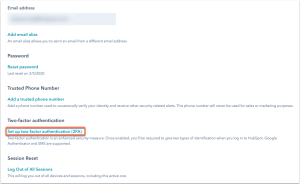
Require 2FA for all users
Two-factor authorization will protect your data, and save both your company and your customers. There’s also strong options, such as PINs and Biometrics, which eliminate the need for an authenticator. Once it’s set up, you will sleep peacefully, I promise!
If you navigate to Settings, then to Security, it’s this setting here:
Protect your data with backups
In the immortal words of RZA, protect ya neck. While he and the rest of Wu-Tang Clan weren’t necessarily talking about data practices, the sentiment applies.
While it isn’t always the most glamorous of tasks, maintaining a schedule of regular backups will ensure that your database is safe should anything happen. There are services that offer this feature automatically, Hubspot doesn’t offer this right out of the box. But you can still manually request and download backups of your instance. We recommend backing up your data at least monthly to ensure that you are protected.
Avoid too many cooks in the kitchen
While it’s good to have more than one Super Admin, having too many can hamper your organization’s security. With each Super Admin added, it adds unnecessary risk. No one is fully immune to social engineering attacks like spear phishing or just using a weak password. It multiplies the risk of data breaches or lapses in compliance.
Sweeping changes like deleting records or changing legal protections can be made easily with a slight adjustment of a workflow. The best case scenario is data loss, and the worst case are breaches of data privacy laws. They can all begin innocently enough, but it’s the Hubspot Admin’s job to remain vigilant for these contingencies.
It’s wise to reduce the number of Super Admin users to only what is strictly necessary.

Keep it lean
Lists are one of Hubspot’s most helpful features, but it doesn’t take long for them to become cluttered. They’ll divide and multiply faster than you think. Especially with Active lists, you can end up with ‘Subscribers’, ‘Existing Subscribers’ and ‘Subscribers 2025’ or even the dreaded ‘New Subscribers USE THIS ONE’. No one can remember who put that part on the end. Was it important? Who knows.
Every quarter you should spent a little time doing through your active lists with a critical eye to make sure that your lists make sense, aren’t duplicated, and are useful for something. You can even use the usage option to check if a certain list is used elsewhere.
Don’t ignore your integrations
Integrations are great. It’s true. But there’s a caveat. They work great when they fix an existing problem, or provide data that the system is incapable of getting on it’s own. But they require maintenance to ensure that they’re pulling in the correct information, and that their fields match up with what Hubspot provides. It could be the case that, for example, Quickbooks counts revenue slightly differently to Hubspot, or that Salesforce runs on accrual while Hubspot runs on cash. Those slight nuances can potentially lead to bad data, or misleading reports. And the only thing worse than no data is bad data.
To fix this, do an audit of your systems, and the objects they interact with, and see which integrations they connect to. This is especially true with older databases, but there might be some connections to defunct systems still active in your database.

Test before you launch
An old National Guard friend of mine shared this gem with me a while ago, and it’s stuck around: ‘You can’t expect before you inspect.’ Taking the time to properly look through workflow triggers, or even just getting a colleague to give it a once over, will reduce the risk of anything bad happening with workflows. No one wants to accidentally send an email to fifteen thousand people because of a slightly mis-typed filter. Trust me.
If you’re unsure of whether a workflow would execute correctly, make a test account (or an entire demo portal if it’s especially complex) and restrict the workflow to only fire on that Contact or Company. Adding in an extra filter so that it only fires if the contact’s email is ‘Testemail@test.com’ will give you the ability to test it in production without the unnecessary risk. Once you’ve given it a few tests, you’ll be in a much better spot.
Take notes
My colleagues and I used to joke that you should take your rigorous notes, on the off chance you get hit by a bus. Or win the lottery, the more optimistic take.
At the end of the day, databases are about sharing information, and making sure that you and your colleagues stay informed regarding the business. It applies to relationship-based marketing, but it equally applies to internal administrators as well. Practices like well-written descriptions, documentation around key workflows and good titles can help make things make sense to new hires. It can also help your organization when that lottery ticket finally comes through.
And finally:
Exercise, drink lots of water, and avoid glowing screens at least an hour before bed.
If these all seem a little too much, or you’re not sure where to start on organizing your Hubspot instance, give us a call and we can comprehensively audit your system, and provide guidance!