Most companies use HubSpot forms to collect lead information, and that’s where they stop.
But with just a bit of planning and the right workflows, those forms can do much more than capture contact details. They can qualify leads in real time, route them to the right person, display a personalized meeting link and trigger a perfectly timed follow-up. And they can do it automatically.
In this post, we’ll break down two real-life examples of how smart form logic and automation made that possible: one for a global software company, the other for a consulting and training business. Each had different goals, buyer journeys and internal sales processes. However, both needed to reduce friction and make it easier to get qualified leads in front of the right people.
If your current form-to-meeting process includes multiple manual steps, inconsistent follow-up or sales reps spending time with the wrong leads, this one’s for you.
Why Smart Form Routing Matters
Delayed or manual follow-up kills momentum. A generic “Thanks, we’ll be in touch” message doesn’t move anyone forward — and may even slow down the buying journey. And when everyone fills out the same form, sales teams often end up with unqualified meetings or missed opportunities.
With HubSpot, you can build forms and workflows that do much more. For example, you can:
- Use conditional logic to customize what the user sees after submitting a form
- Assign contact owners and territories automatically based on form inputs
- Trigger personalized follow-ups and workflows based on behavior
The result is a faster, more relevant experience for leads — and a smoother, more scalable process for your team.
Example #1: Automatically Route Leads by Country and Assign the Right Rep
This company needed to streamline demo requests coming in from across multiple regions. Manually routing leads to the correct rep was creating delays, inconsistent experiences and dropped handoffs. They also wanted to follow up with contacts who filled out the form but didn’t actually book a meeting.
Here’s how we used HubSpot to automate the process:
- A demo request form used conditional logic to detect the contact’s country.
- Based on the selected country, the form displayed the scheduling link for the correct regional rep.
- A connected workflow automatically assigned the right territory and contact owner in the CRM.
- If the contact didn’t book a meeting immediately, another workflow enrolled them in a follow-up email sequence, sent from the correct rep (and in the correct language!), to encourage scheduling.
This setup eliminated manual triage, improved response speed and ensured no demo requests fell through the cracks while creating a personalized and regionally appropriate experience from the start
Example #2: Recognize Returning Leads, Personalize Scheduling and Automate Follow-Up
This client needed a more advanced system. They offer a variety of services and frequently work with repeat clients, so maintaining continuity and personalizing the experience was a must.
Here’s how we built it:
- The HubSpot form lived on a landing page with Smart rules, each tied to a list of contacts assigned to a specific rep.
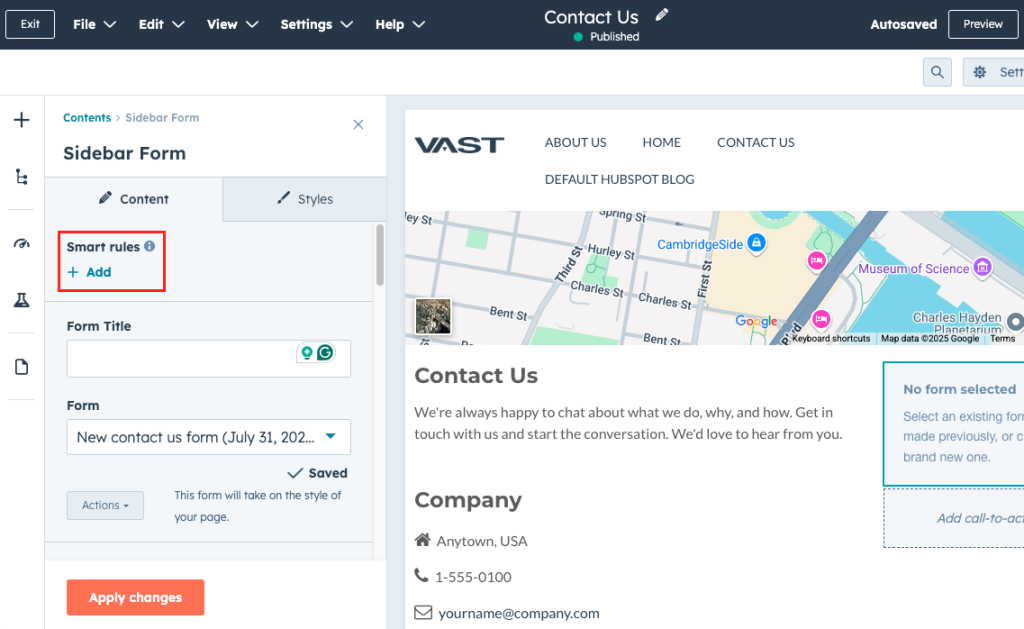
- If a visitor was on a certain list (in this case, meaning they were an existing contact with an owner), they saw that rep’s personalized scheduling link. (See screenshot below on where and how to select lists when setting up this logic.)

- If they weren’t on any list, the default form assigned the lead via round-robin and showed the corresponding link for their new rep.
- After the form was submitted and a meeting was booked, a “proof of life” email confirmed the address and ensured a real person was on the other end.
- Based on the selected area of interest (keynote, training, coaching, etc.), contacts were:
- Enrolled in the appropriate nurture sequence
- Sent targeted follow-ups from the assigned rep
- Automatically had a deal created with the correct pipeline stage and service tags
This setup allowed for nuanced lead handling, adapting in real time to who the contact was and what they needed — without burdening the team with manual sorting or follow-up.
Whether someone was a brand-new prospect or a longtime client, the system delivered a high-touch, relevant and seamless experience with no manual steps required by the team.
What These Workflows Have in Common
Despite the different use cases, both systems followed the same formula:
- Use HubSpot forms as the launchpad for automation
- Apply conditional logic to guide the experience
- Let workflows handle everything behind the scenes — routing, follow-up and deal creation
With this approach, you give reps cleaner leads, give buyers a smoother journey, and eliminate the gaps that slow things down.
Ready to Make It Happen?
Whether you’re routing leads by geography, managing repeat contacts with assigned owners, or tailoring follow-up based on service interest — HubSpot has the tools to make it seamless.
These aren’t just technical builds. They’re strategic systems that reduce admin work, improve speed-to-lead, and create better experiences for everyone involved.
Ready to turn your forms into real sales accelerators? Let’s get the conversation started.