AI in HubSpot hasn’t slowed down since this post first went live. At INBOUND 2025, HubSpot announced sweeping updates — from new AI Agents and a centralized Data Hub to a fresh growth model called The Loop. These changes signal something important: we’re moving beyond “AI helpers” to full-blown human + AI teams built directly into HubSpot.
So what’s actually useful now? And what’s still not ready for primetime? Let’s revisit the tools that deliver real value today — plus a few of the new releases worth keeping an eye on.
HubSpot’s Most Useful AI Features (Updated for 2026)
A lot has changed since last year’s INBOUND releases. When many of these tools first launched, they were still pretty rough. By spring 2026, there have been big improvements and some favorites have emerged. At this point, our current top three picks for the most useful AI tools that are worthwhile:
- Data Agent + Smart Properties: This is a go-to way to quickly create new properties and enrich records using unstructured data and third party web research. This is a great place to start putting credits to use for better data and segmentation. (Watch our walk-through here.)
- Prospecting Agent: The quality of emails has gotten much better compared to when this agent launched. We still recommend keeping a human in the loop by requiring approval vs going fully autonomous, but we encourage testing this out both for cold outreach and customer engagement. (Learn more here.)
- Customer Agent: HubSpot has made this AI tool a big focus and it has made leaps since launching. This agent can be used for sales, marketing, service or even internal training. (Learn more here.)
Go deeper: How HubSpot’s New AI Agents Are Solving Real B2B Challenges
Overview of HubSpot’s AI Tools
HubSpot’s AI capabilities now fall under one umbrella: Breeze AI. Formerly, we talked about “Copilot” as a separate feature; now it’s part of the larger suite. The better way to think of it: Breeze is the engine, and it powers several function-groups across your sales, marketing and service workflows.
Rather than walking through every feature by product name, we’ll group them by what they help you do and what kind of results you can reasonably expect. That way, you can assess what’s worth a closer look quickly.
Content Assistance (Now part of Breeze)
The embedded AI writing and editing tools you’ve used before are still here, but now they’re part of the Breeze suite. You’ll find them across email builders, blog editors, landing pages, CTAs and social tools. They let users generate, rewrite or summarize content directly inside the editor.
Whether you’re drafting your first version of a blog post or shortening a subject line, these tools remove friction and accelerate production. One of the most helpful (and still under-used) capabilities is remixing content: take one piece and reformat for different channels. With the right prompt and inputs, Breeze helps transform a product page into a LinkedIn post or turn a blog into a nurture email sequence. The results still need human editing, but for teams juggling multiple channels and “do more with less”, this remains a strong time-saver.
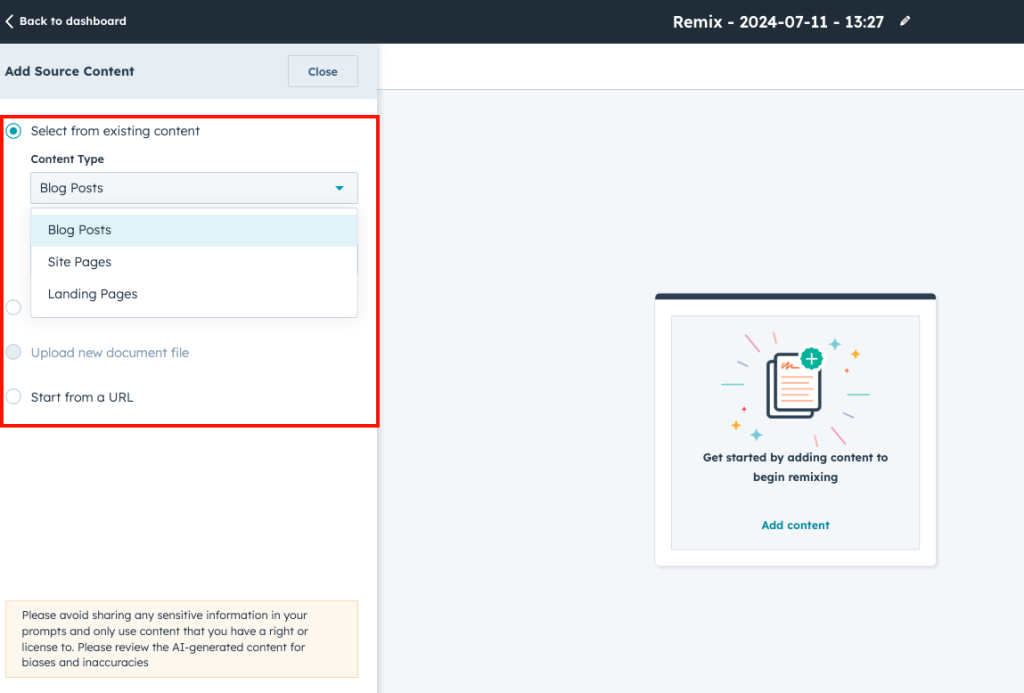
Use case: Scaling content production across your marketing and sales teams without sacrificing time or consistency. For example, a marketing manager uses Copilot to spin a single product blog into a three-email nurture sequence and a short CTA for paid search, cutting production time by more than half.
Task + Workflow Automation
Breeze isn’t just about writing. It now supports AI-driven automation that helps teams handle repetitive prep work across sales, service, and marketing. CRM record summarization, meeting briefs, contact data autofill, and deal insights are all powered by Breeze and available across Hubs.
These aren’t flashy updates, but they make a measurable impact. For new hires or anyone juggling a heavy pipeline, Breeze removes the manual prep work so your team can spend more time with customers.
Use case: Reducing manual work, especially for sales and service teams, so they can focus on higher-value conversations. This would be ideal for a sales rep heading into a discovery call: use CRM summarization to get key account context, contact history and deal updates in under a minute — without combing through notes or past emails.
AI Agents
Breeze also powers the family of AI agents that handle more complex, context-driven work across content, sales, and service. Some of these agents are still rolling out, but a few are already making a difference for teams using them strategically.
- Customer Agent: Uses your connected knowledge base and public URLs to answer live chats and support tickets in real time. If your knowledge base is organized, this can offload a big chunk of repetitive service questions.
- Content Agent: Helps generate long-form assets such as blog posts, landing pages, and case studies. The quality depends on your inputs, but it’s useful for early drafts.
- Prospecting Agent: Assists sales teams by researching leads and tailoring outreach based on CRM data.
- Knowledge Base Agent: Suggests or drafts replies for support content using existing articles.
Of these, the Customer Agent is the most production-ready. The others show potential, but their results still depend heavily on clean data and well-structured processes.
Use cases: There are some promising use cases for service and sales support. For example, a support team deploys the Customer Agent in their chatflow to handle routine questions about billing, login issues, and product setup — freeing live agents to focus on higher-complexity cases.
AI-Powered Data Intelligence
Breeze also extends into analytics and decision-making. Several features within Breeze Intelligence help teams interpret and act on CRM data with less manual work:
- Buyer Intent Scoring surfaces companies showing signs of purchase interest based on web behavior. Using HubSpot’s tracking code and reverse-IP lookup, the tool identifies anonymous visitors, matches them to companies and evaluates their behavior — like multiple visits to pricing or demo pages.
You define the intent criteria, and HubSpot flags accounts that meet them. It’s practical and keeps sales focused, but accuracy depends on solid lifecycle and tracking setups.
That said, buyer intent scoring is only as strong as the signals it’s pulling from. If your lifecycle stages are inconsistent, or your tracking setup is incomplete (e.g., key pages aren’t tagged properly, or forms aren’t mapped), the scores may be skewed or misleading. And while the AI layer is helpful, it’s not always transparent — so if your team needs full visibility into how scores are calculated, this feature may feel a little opaque.
Use case: A sales manager uses buyer intent scoring to prioritize follow-ups with leads who’ve viewed pricing and demo pages multiple times — ensuring reps are focusing on prospects with high conversion potential without relying on manual lead scoring criteria.
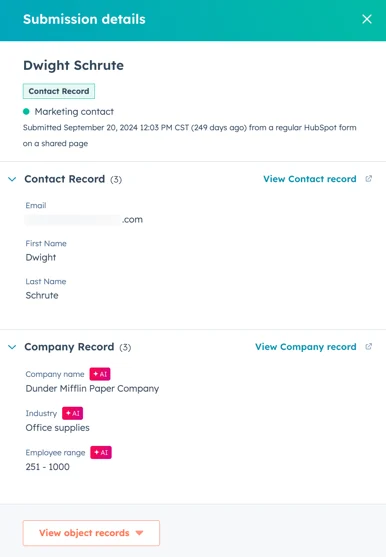
- Form Autofill (Form Shortening): This tool reduces friction during form submissions by pre-populating known fields for returning contacts. It’s simple to enable and often boosts conversion rates. Any AI-enriched data shows up in the submission details, giving teams clean, complete records with less effort from users.
- Contact and Company Enrichment: HubSpot’s enrichment feature automatically fills in CRM fields — like industry, company size, job title, and revenue — using public and third-party data. When it works, it’s great for better targeting and lead routing, but accuracy varies.
Together, these tools can sharpen targeting and simplify lead management, but they still rely on good inputs. Think of them as “assistants with potential,” not “set-and-forget solutions.”
Segments: Lists, Reimagined
HubSpot’s old “Lists” have taken on a new name — and a new brain. The rebranded Segments use AI to help you find, understand and activate audiences faster. Think of it as a remix of one of HubSpot’s most-used tools, but sharper, smarter and built to adapt in real time.
Here are the highlights:
- AI audience discovery finds patterns in your CRM data and suggests high-value segments you might’ve missed.
- Cleaner logic makes it easier to mix “AND” / “OR” filters and build precise, dynamic audiences.
- Instant activation lets you use Segments across pages, CTAs, and campaigns — no exporting required.
- Unified reporting shows how each segment performs, tying engagement directly to revenue.
It’s a small rename (and we’re still getting used to it!) with a big mindset shift: Lists were for sending; segments are for learning.
Smart Properties: Data That Adapts
Another subtle yet powerful update is Smart Properties, which uses AI to automatically interpret or enrich information. Instead of managing endless custom properties, Smart Properties evolve with your data. They can classify contacts, score engagement or group behaviors on the fly.
Used together, Smart Properties and Segments are turning HubSpot into more than a CRM. It’s becoming a learning system — one that adapts with every click, view, and conversion.
Breeze AI Assistants (Improved)
The new generation of Breeze AI Assistants now works across all Hubs — summarizing, writing and analyzing in context. Whether it’s surfacing insights from a deal record or generating an email outline from a meeting note, these Assistants save real time with minimal setup.
Together, these features make up the most useful layer of HubSpot AI right now: practical, proven and ready to make a difference without a major overhaul.
Still a Work in Progress
A few tools show real promise but aren’t quite ready for wide adoption yet; they still come with a few caveats:
- Long-form content agents still need heavy editing to match tone and voice
- Prospecting Agent is only truly effective if your CRM is exceptionally clean and well-tagged
- Enrichment tools can be helpful in the right use case, but expect spotty results from some of them.
- Automated chat replies are fine for simple questions, but not ready for nuanced or complex scenarios without manual review.
Where HubSpot AI is Headed Next
HubSpot hasn’t slowed down since this post first went live in July 2025, and isn’t likely to any time soon. At INBOUND 2025, they rolled out new AI tools and a clearer vision for how they’ll shape sales, marketing, and RevOps in the coming year. If you’re already using the features above (or deciding which ones to test next) here’s what’s also new and definitely worth considering:
Beyond the everyday tools already driving results, HubSpot’s newest updates show where the platform is heading: toward deeper data intelligence and a more unified customer view. Here are several other items on our radar:
- The Loop Framework: While not a “feature” in itself, The Loop represents a major shift in how HubSpot is framing growth. Built around four stages — Express, Tailor, Amplify, and Evolve — it replaces the linear funnel with a continuous cycle of feedback and improvement. It’s less about launching campaigns and more about learning from them in real time, with AI helping teams adapt faster.
- Data Hub (in early rollout): HubSpot’s new Data Hub consolidates customer, marketing, and external data sources in one governed environment. It dramatically improves deduplication, enrichment, and data hygiene — laying a stronger foundation for AI accuracy across every Hub.
The portion of Data Hub that syncs and transforms external data into HubSpot’s CRM through Data Studio is still in beta, but it’s a strong signal of where HubSpot is heading: a more open, enterprise-ready data model that supports cleaner analytics and more intelligent automation.
- AI-Powered CPQ for Commerce Hub (beta): The new configure-price-quote tool uses AI to auto-build proposals and pricing from CRM data. Currently in beta, it connects marketing, sales, and finance workflows, reducing manual setup and shortening the sales cycle once fully live.
- Answer Engine Optimization (AEO): With most searches now ending in zero clicks, HubSpot’s early-stage AI-driven AEO tools help brands stay visible in voice and chat results. While still in beta, this functionality is worth watching as search behavior continues to shift toward AI assistants and conversational interfaces.
Like any good remix, these updates don’t replace the fundamentals. They just make what already works a little more electric and a lot more efficient.
How to Get More Value From HubSpot’s AI Tools
Even with all this innovation, success with HubSpot AI still comes down to the basics: clean data, clear processes, and a strategy that puts people before automation. The next generation of tools will only be as effective as the systems behind them.
No matter which features you try, your results will depend on how strong your foundation is. Here are four steps we recommend before — or while — you roll out AI features in HubSpot:
- Clean and tag your CRM. Bad data won’t just limit results; it’ll confuse the AI. The cleaner and more current your records, the smarter your insights will be.
- Clarify your brand voice. Even a few tone and messaging guidelines will make content tools more useful and consistent. A clear voice helps AI sound like you, so take the time to set up your brand voice.
- Use AI to draft, not decide. These are accelerators, not replacements. Keep humans in the loop for judgment calls, nuance and quality control.
- Track what’s working. Document and share your best use cases so teams know what to lean on and where it’s best to stay hands-on.
AI can accelerate great processes, but it can’t fix broken ones. The more intentional your setup, the more value you’ll get from AI tools. Start small, stay curious and build from what’s already working.
Final Thoughts
HubSpot’s AI capabilities are evolving fast. Some already save teams hours each week, while others still need more refinement — just like any new team member would.
You don’t need to adopt everything. Focus on the tools that fit your goals, processes and systems. Then, revisit the rest when you’re ready.
Want help building smart, scalable systems with HubSpot AI? Let’s talk.