In marketing and advertising it is essential to demonstrate value. One of the best ways to prove that is through robust conversion tracking and enhanced conversion rate optimization (CRO). Both directly influence the bottom line of a business.
Identifying the customer engagement actions that are most valuable and align with business goals is a necessity. Whether they are generated though paid advertisements, phone calls, chat bot conversations, or other online interactions, all can contribute to a successful sales pipeline. Marketing platforms, such as Google Ads, Google Analytics, Google Tag Manager, Microsoft Ads, and HubSpot handle conversion tracking a bit differently. But each empowers advanced techniques for analysis and tracking.
The benefits of following best practices for tracking and optimizing conversion rates across your marketing channels are laid out in more detail below.
Conversions and Leads
Before diving into the technical ins and outs of tracking conversions, it will be helpful to cover what role qualified leads play in the conversion process and lead journey. This article from HubSpot diagnoses the process of a lead going through several stages before turning into a customer. Knowing these lead stages is crucial for closing the deal!
Marketing Qualified Leads (MQLs) and Sales Qualified Leads (SQLs) are critical concepts in lead conversion, playing a vital role in the sales funnel. Understanding how they interact with conversion tracking is essential for effective sales and marketing strategies.
Marketing Qualified Leads (MQLs)
Role in Conversion Tracking: MQLs are often the initial conversions tracked. They represent the effectiveness of top-funnel marketing activities. Conversion tracking helps to refine the criteria for MQLs by establishing which marketing activities are leading to meaningful engagement.
Sales Qualified Leads (SQLs)
Role in Conversion Tracking: Tracking SQLs focuses on middle to bottom-funnel activities. The main goal of converting these leads is understanding which MQLs are turning into actual sales opportunities and the effectiveness of the sales team.
Understanding leads in the marketing and sales funnels will better inform your efforts with tracking conversions. Ultimately, properly qualified leads are more likely to convert, leading to a higher ROI for marketing and sales efforts, and ultimately, a more successful business outcome.
So, without further ado, let's examine expert techniques for getting the most from your conversion tracking.
Setting Up Effective Conversion Tracking
So, you have identified the actions taken by customers that have the most potential value for your business. Ideally, you will add a conversion tag that is triggered by a visitor completing an important action, such as filling out a contact form, calling from a mobile paid ad, downloading a gated document, or requesting a service quote.
Implementation requires back-end access to websites and marketing platforms. Since there is a technical component involved, less tech savvy folks may need help from a developer or technologist. Proper setup of conversion tracking is critical for accurate data and analysis.
The most important aspect of setting up tracking is choosing actions that truly prove valuable to business. Select user and website interactions that have the highest probability of transforming into a qualified lead.
For example, a phone call placed from a mobile paid advertisement that lasts longer than 60 seconds strongly indicates a very interested customer. It would be appropriate to count that interaction as a conversion.
Also of great significance is where and when to count an interaction as a viable conversion. Conversions should be recorded only after an important action has been taken by the user and the resulting page view or event has occurred.
Here are some conversion tracking fundamentals to follow:
- For element or link clicks, always specify a page URL that loads after a form is submitted or purchase order placed.
- Form submission conversions work best when configured to fire on submit events from platforms that assign a Globally Unique Identifier (GUID).
- Use unique, meaningful names or labels for your tracking tags and their associated conversion actions. There could be numerous conversion sources on a single website that utilize the same method (such as a web form). Generic names such as "form_1" can cause confusion, complicate troubleshooting, and interfere with accurate analysis.
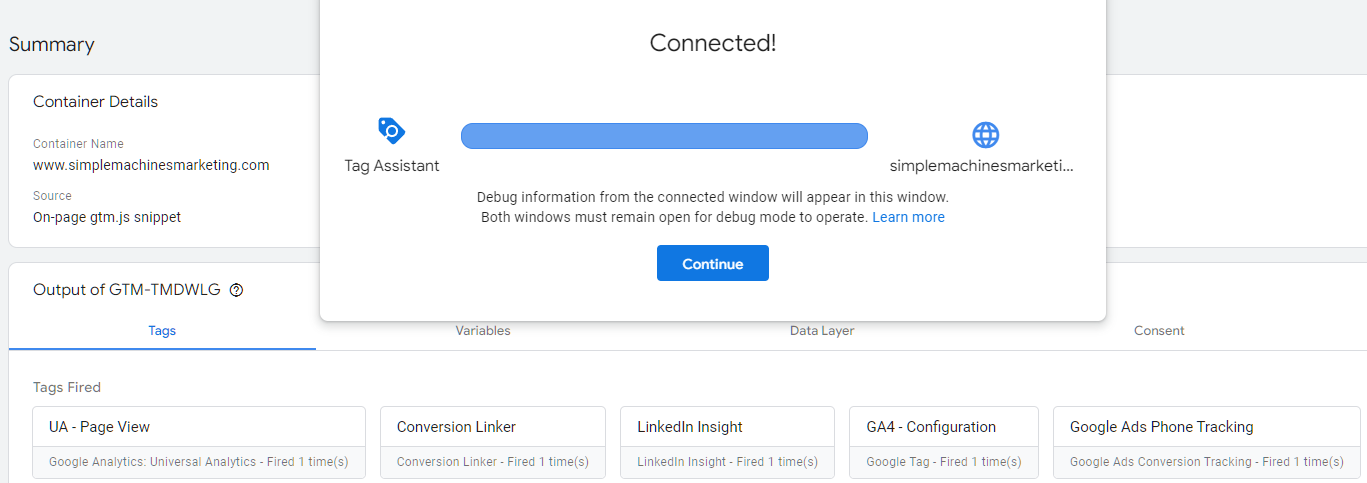
- Always test new conversions to make sure they work as intended! Never assume that you chose the correct element ID or CSS class to trigger an action. Especially without using a unique ID, this can be a process of trial and error.
***
Google Ads Pro-Tip:
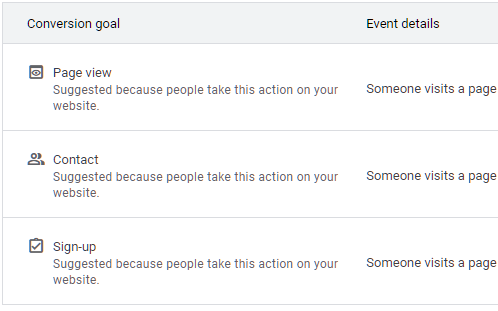
- Never use a general landing page view or page load event for your website conversion tracking, unless those pages are shown after an important user action (such as a "thank you" or an order submission page).
- Conversions should only be recorded for actions that have a substantive impact on your bottom line. A mere button click or page view does not necessarily translate into a lead!
***
Google Analytics 4 Pro-Tip:
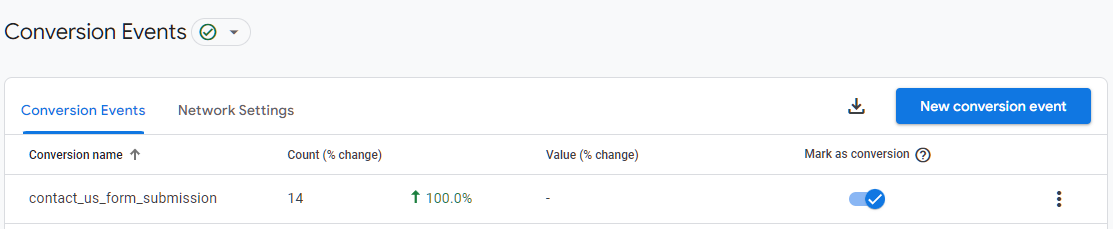
- Always use the same naming scheme (lowercase and underscores) for your conversions as the default events in GA4.
- This ensures consistency among all the Google products you utilize for tracking conversions.
- Also, be sure to label each conversion identically between Tag Manager and all other tracking platforms; this will help with fixing bugs and managing event tags and triggers.
Here is a brief reference for how to install conversion tracking across several major platforms:
Google Ads:
- Create a website conversion action in Google Ads, or import conversions from a connected Google Analytics account.
- Install the Google Ads conversion tracking tag on your website, either directly or via Google Tag Manager.
- Align conversion tracking with specific campaigns to monitor their effectiveness.
Google Analytics 4 (GA4):
- In GA4, set up 'Events' to track user interactions.
- Use the built-in events or customize your own based on the actions you want to track.
- Toggle the "Mark as conversion" switch next to the event to create a conversion.
- Link GA4 with your Google Ads account for comprehensive tracking.
Google Tag Manager (GTM):
- Use GTM to manage tags for different platforms without altering website code.
- Set up triggers and tags in GTM for each type of conversion you wish to track.
- Ensure proper configuration to avoid discrepancies in data.
- Submit changes to the account and container to publish them to the live website.
- Use Preview mode for robust testing of tags and triggers in real time.
Microsoft Ads:
- Create conversion goals under Tools > Conversion tracking.
- Place the UET (Universal Event Tracking) tag on all website pages.
- Customize the tag to track specific actions as conversions.
HubSpot:
- Install HubSpot's tracking code on your website.
- Set up conversion goals within HubSpot's platform, often tied to form submissions or email sign-ups.
- Integrate with other platforms (like Google Ads) for a broader view.
Introduction to Conversion Rate Optimization (CRO)
Now that tracking has been implemented across your digital channels, and you are collecting data on visitors, it is time to think about your conversion rate optimization, or CRO.
As shown in a WordStream 2023 industry benchmarks document, the average conversion rate in Google Ads is 7.04%. This rate varies by industry, but is a good reference point for evaluating the success of your own campaign objectives. Further, the article goes on to state, "Conversion rate can directly correlate with your business's bottom line, since bringing in more conversions can offset your costs per lead."
Accordingly, monitoring and optimizing your conversion rate is paramount for meeting your business objectives most effectively. This is a multifaceted process that involves understanding user behavior, testing different website elements, and making data-driven decisions.
Put simply, strategically coaxing more engagement and favorable interactions from your visitors is the key to better conversion rates!
Here are some CRO fundamentals to consider:
- Conversion Rate Calculation: Regularly monitor your conversion rate (the number of conversions divided by the total number of visitors). Benchmark these rates against industry standards to set realistic improvement goals.
- Use A/B Testing: Experiment with different elements (like CTA buttons, page layouts) to see what works best.
- Prioritize User Experience: Ensure that the website or app is user-friendly, as a positive experience is closely linked to higher conversion rates.
- CTAs: Create compelling and clear calls-to-action.
- Client Satisfaction: For businesses providing leads to clients, delivering high-quality, well-qualified leads can significantly impact client satisfaction and retention.
- Conversion-Driven Strategies: Conversion tracking data is invaluable in refining the criteria for MQLs and SQLs, leading to more effective marketing and sales strategies.
- Website Performance: Make sure the website is responsive, loads quickly and is fully optimized for mobile devices to maintain user engagement and avoid exits.
Improving CRO is an ongoing process that requires continuous monitoring, testing, and adaptation to the ever-changing digital landscape.
Analyzing and Reporting Conversion Data
As just mentioned, continuous monitoring and adjustment is necessary for improving conversion rates, and driving qualified leads from your conversion sources. There are several performance analysis platforms, such as Google Analytics and HubSpot, that will empower your conversion data measurement and reporting. You must regularly review this analytics data to understand user behavior and tweak strategies accordingly.
However, this effort will pay off accordingly with the insights you can leverage from the conversion data. They will inform your overall strategy for converting visitors into leads and making sales.
Also of value is knowing the ways in which users regularly engage with your website. These insights can provide information about conversion trends. Our article about understanding Google Analytics 4 sessions is a good starting point.
Here are some tracking analysis fundamentals to follow:
- Use UTM parameters for tracking campaign performance and attributing sources. This is an essential step, see more below.
- Conduct regular audits and updates to tracking setups. Change tactics as needed to respond to the data.
- Utilize data visualization in reports for better insights.
- Look at segments in Google Ads to see what paid campaigns, ad groups, and keywords are driving the most conversion events.
***
Google Ads Pro-Tip:
- To see what conversion actions were triggered by your keywords, click on Segment in the Keyword table navigation bar, and select Conversions > Conversion Action (or All Conversions).
- Every conversion driven by a particular keyword will be displayed underneath, with the count shown in the column to the right.
- You can make decisions based on this data about what conversions are working and which aren't.

How UTMs Work with Conversion Tracking
UTM parameters (Urchin Tracking Module parameters) play a crucial role in conversion tracking by allowing marketers to track the effectiveness of online marketing campaigns across traffic sources and media. They work by adding specific parameters to URLs, enabling the tracking of user interactions with these URLs in analytics tools like Google Analytics and HubSpot.
Setting Up UTMs in Google Ads Tracking Templates
Google Ads allows you to use tracking templates to automatically add UTM parameters to your URLs, ensuring consistent and accurate tracking across your campaigns.
Step 1: Define UTM Parameters
- Campaign Source (utm_source): Identifies the source of traffic, such as 'google'.
- Campaign Medium (utm_medium): The medium through which traffic is coming, like 'cpc' for cost per click.
- Campaign Name (utm_campaign): The specific campaign name.
- Campaign Term (utm_term): Used for paid search to identify keywords.
- Campaign Content (utm_content): Differentiates similar content within the same ad.
Step 2: Create a Tracking Template in Google Ads
- Access Your Google Ads Account: Log in to your Google Ads account.
- Go to Campaign Settings: Choose the campaign you want to add tracking to.
- Navigate to Additional Settings: Scroll to the "Settings" section of your chosen campaign.
- Find Tracking Template Field: Under "Campaign URL options", you will find the "Tracking template" field.
- Enter Your Tracking Template: Here, you can enter a template with UTM parameters.
For example:
?utm_source=google&utm_medium=cpc&utm_campaign=&utm_term=&utm_content=
- is a Google Ads ValueTrack parameter that represents your landing page URL.
- utm_source, utm_medium, etc., are your UTM parameters.
- Google Ads offers several ValueTrack parameters (like for the triggered keyword in a search campaign) that can be dynamically replaced in your URLs.
Step 3: Include Campaign-Level Custom Parameters (Optional):
- You can set custom parameters at the campaign level (like ) to dynamically insert campaign names or other custom values.
By using UTMs in Google Ads tracking templates, you can gain granular insights into campaign performance, allowing for more informed decision-making and optimized marketing strategies.
Tracking Accurate Conversions for Optimal Results
Conversion tracking and conversion rate optimization (CRO) are crucial components of digital marketing strategies. They enable businesses to understand customer behavior, measure the effectiveness of their marketing efforts, and enhance the user experience to drive more conversions, whether from sales, leads, sign-ups, or other defined actions.
The quality of a conversion really determines how much value it brings to the business. Obtaining a name, email and phone number can empower future marketing efforts. The same submission can also translate into a sales opportunity for closing deals. Follow the rules set out above and your conversion rates could translate into better leads and increased profits.
Correctly implementing the right conversion actions for your sales channels and platforms is an important part of a successful marketing strategy. Do you need more insight about tracking your conversions or setting them up? Reach out and schedule an appointment; we are happy to discuss your project and share our expertise!