If you're a consultant looking to grow your book of business, basic attributes like company size, industry, revenue and location only get you so far.
HubSpot's data agent and smart properties help consultants and firms improve targeting by automatically enriching contact and company records with real-world insights from the web.
We've been testing this tool for consulting clients and the key benefit that we are seeing is a sharper, more focused view of who's worth your time and outreach.
Going Beyond Firmographics
In previous years, many consulting firms could get away with less precise targeting due to a combination of more favorable economic conditions, less competition and more inbound opportunity to be won through tactics like thought leadership content and SEO.
Now, the picture is much different. A July 2025 Nextcontinent report highlights that U.S. consulting firms face decelerating demand due to client budget constraints, slower decision cycles and geopolitical instability. Combine that with more competition and the rise of zero-click search, and it's clear firms need to adapt.
What separates those that consistently find the right opportunities from those who don't isn't how many companies they target, it's how precisely they target them. Timing and context matter just as much as fit.
Basic firmographics are okay for a starting point, but they won't tell you who actually needs your help right now. For example, a 500-person company might look great on paper, but if they're not facing the challenges your firm solves for, they're not really a good lead.
This is the data gap addressed by HubSpot's data agent and smart properties. Used right, they give you a clearer picture of what's happening inside your target companies — what they're prioritizing, where they're struggling, and when they might be in the market for help. Instead of just tracking who a company is, you can start tracking what they're signaling.
The Shift from Who They Are to What They're Signaling
Traditional targeting tells you who a company is. Signal-based targeting tells you what's going on inside that company such as the priorities, pain points and changes that suggest they could use your help.
For consulting firms, those signals can be powerful. A company with a new CEO might be rethinking culture or strategy. A manufacturer with a wave of negative employee reviews might be struggling with retention. A professional services firm with publicly shared leadership programs are likely actively investing in development.
These are clues, and they're all out there in public data, waiting to be used.
HubSpot's smart properties make it possible to capture those signals directly inside your CRM so your team doesn't have to guess who's in market. Instead of sorting through static firmographics, you can segment based on indicators that tie directly to your value — who's growing, who's struggling, and who's signaling that they care about the problems you solve.
This shift from demographic targeting to contextual targeting changes everything about how firms prioritize leads, personalize outreach and decide where to spend their time.
How to Create a Smart Property in HubSpot
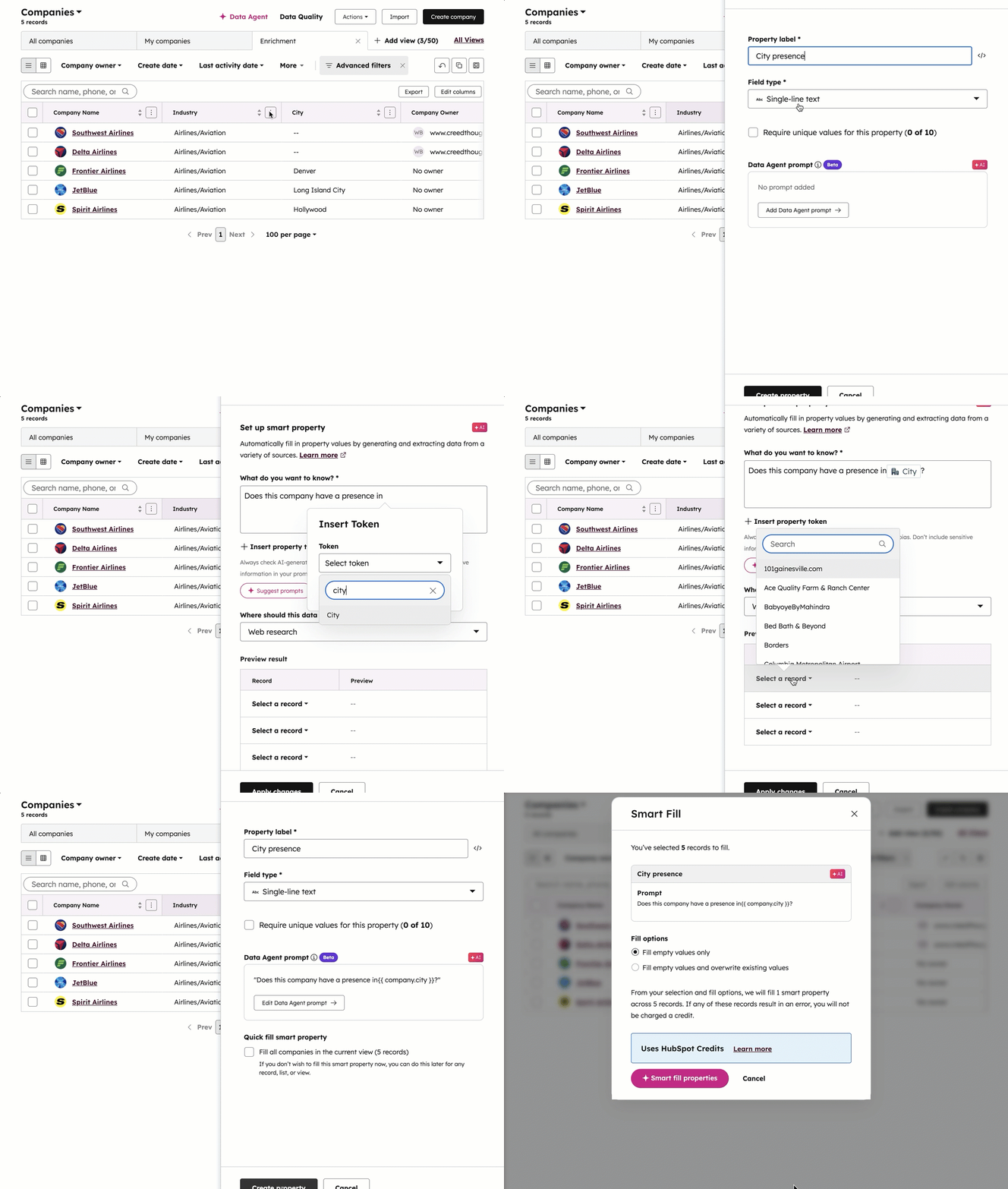
Step 1: Go to your records
In your HubSpot portal, open the CRM section and choose either Companies or Contacts from the menu.
Step 2: Open a view
From the table view of your records, click the three vertical dots in the upper-right corner and select Add column.
Step 3: Start a new property
Select the Create new tab, then choose Create manually.
In the panel that appears on the right, type a name in the Property label field.
Step 4: Choose the field type
Use the Field type dropdown to pick the kind of data you want to collect. You can choose from:
- Single-line text
- Multi-line text
- Number
- Single checkbox
- Multiple checkboxes
- Radio select
- Dropdown select
Step 5: Configure your Data Agent prompt
Click Add Data Agent prompt to set up how HubSpot will fill the property automatically.
Enter a question in the What do you want to know? field—for example, Does this company have a location in ?
You can click Insert property token to include existing record data in your question.
Step 6: Select the data source
Choose where HubSpot should gather the information from:
- Web research – pulls data from public sources using the company's domain.
- Company website – extracts information directly from the company's main website.
- Property data – references another property on the same record (works for contacts and companies). If the source property is a file, HubSpot will use the first uploaded PDF.
- Call transcripts – analyzes the last five associated call transcripts (available for contacts and companies).
Step 7: Preview and apply
Select a record to test your setup and make sure it works as expected, then click Apply changes.
Step 8: Run and save
If you'd like HubSpot to fill in data for all records in your current view, check Fill all [records] in the current view.
Click Create smart property to finalize it, then hit the Save icon in the top-right corner to save your updated view.
You can also create smart properties from the data agent page:
From Insight to Action
Once this data is in place, the opportunities multiply. Consulting firms can:
- Filter and score leads based on their smart property data
- Personalize outreach around the themes prospects already care about
- Build automated lists and workflows that surface new companies showing key signals
- Equip sales and marketing with shared visibility into where the best-fit opportunities are emerging
It’s a simple but powerful shift from static lists to dynamic signals.
Next Steps
If you’re already using HubSpot, implementing this approach is straightforward:
- Identify the buying signals most relevant to your firm’s services.
- Create corresponding smart properties in HubSpot.
- Use the data agent to automate enrichment from trusted web sources.
- Layer these properties into your lead scoring, segmentation and workflow automation.
The key is to start with signals that connect directly to your value proposition. For example, if your firm specializes in organizational design, you might track leadership changes or M&A activity. If you focus on employee engagement, monitor employer review trends and hiring growth.
The Bottom Line
For consulting firms, success often depends on spotting the right opportunity at the right time. By enriching your CRM with contextual data , you can finally see more than just who a company is — you can see what they’re signaling.
The firms that embrace this approach don’t waste time chasing the wrong leads. They focus where the timing, need and potential impact align. And that’s what smarter targeting looks like.