Before I started building pipelines in HubSpot, I used them as a salesperson. I remember deal stages that made no sense, the ten required fields just to move a deal forward and the dashboards that looked impressive but didn’t reflect reality.
Many companies build pipelines with the best intentions. They want visibility, consistency and better forecasting. But in practice, the pipeline often morphs into something reps avoid until it’s time to clean things up at the end of the month.
Even with a tool like HubSpot, it’s easy to over-engineer the pipeline. Then it can feel like more of a burden than a resource. When that happens, adoption drops, data quality slips and forecasting turns into guesswork.
That’s why it’s wise to design pipelines by thinking like a rep first. If it doesn’t make the sales process easier, it won’t get used. And if it’s not getting used, it’s not doing its job.
The good news? You can build a pipeline your team wants to use. One that reflects how they sell, keeps things simple and gives you clean, usable data. Here’s how to do it.
Start With Reality, Not a Whiteboard
The best pipelines reflect what really happens in the sales process, not what leadership wishes would happen. Before creating or editing anything in HubSpot, talk with your sales team. Map out a few recent deals from start to finish. Look for natural points of progression that can translate into deal stages.
You’re looking for patterns: key decision points, handoffs, or milestones where something meaningfully changes in the buyer’s journey. For example, when does the team typically send a proposal? What’s happening right before a deal is marked Closed–Won? These are the moments that should anchor your pipeline — not every small task or to-do.
Don’t Overbuild It
One of the most common problems we see is pipelines that try to do too much. Seventeen deal stages. Stage names that describe actions rather than progress. Custom properties that clog up records but never get used. All of it creates friction, and friction kills adoption.
Keep your stages focused on major milestones. Ask yourself: “If I looked at this deal at this stage, would I know what’s happening?” If not, the stage probably needs to be reworked or removed.
And be careful about adding custom properties to stages. It’s tempting to collect as much data as possible, but if your reps have to fill in six fields just to move a deal from one stage to the next, they’re going to stop using the tool altogether. When in doubt, keep it simple.
Use Required Fields Thoughtfully
HubSpot gives you the option to require fields when a deal moves to a new stage. This can be useful — but only if you use it sparingly and intentionally.
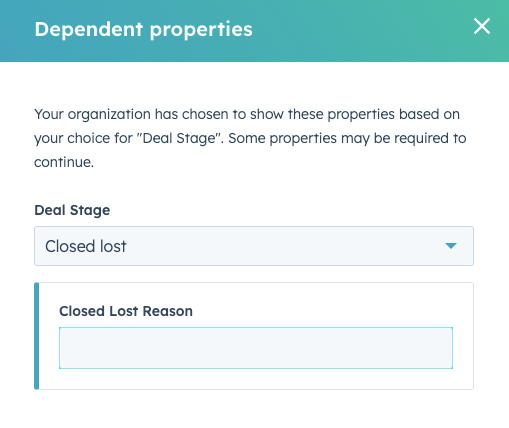
Start by identifying which pieces of information are absolutely necessary to track a deal’s progress or report accurately. Then ask yourself whether it makes sense to collect that information at that particular stage. If not, hold off. You can always require it later, when it’s more relevant.
This approach keeps deals moving while still giving you the data you need. And your reps will appreciate not being asked to fill in a dozen fields that feel irrelevant to their conversation with the buyer.
Deal Stages Should Mean Something
Too often, we see pipelines with vague or redundant stage names: “Meeting Booked,” “Follow-Up,” “Verbal Yes,” and so on. The problem with these labels is that they don’t tell you much. What kind of meeting? What are you following up on? What does “verbal yes” actually mean, and what happens next?
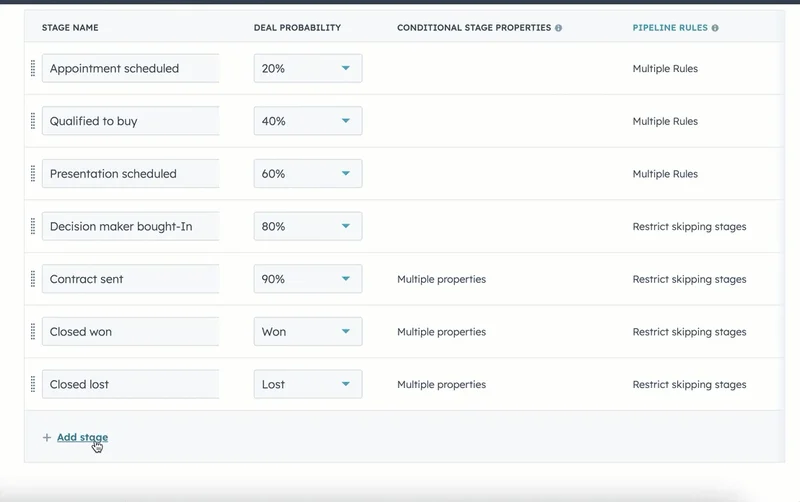
Your deal stages should reflect concrete buyer decisions or outcomes. “Qualified to Buy,” “Proposal Sent,” or “Negotiation in Progress” are all examples of clear, purposeful stage names. They give reps and sales managers an immediate sense of what’s going on with a deal, without needing to open the record. Deal stages are easily customizable in HubSpot, which means there’s no reason to stick with labels that don’t reflect your sales process.
And remember, stage names aren’t just for internal use — they show up in dashboards, reports, and revenue forecasts. Clarity is worth it.
Don’t Create a Deal Until There’s a True Opportunity
A deal shouldn’t be created just because someone filled out a form or booked a meeting. It should represent a real opportunity — something that’s been qualified to some degree, with a clear potential for a sales conversation to move forward.
That doesn’t mean you need a proposal drafted or a budget confirmed, but there should be enough intent and fit to suggest that this could become a customer. A deal is a signal that the sales process has truly started, not simply that someone showed mild interest.
Yes, there are exceptions. In some cases, a booked meeting does reliably indicate a qualified opportunity. But for most teams, creating deals too early only clutters the pipeline and throws off reporting. Track early leads in the CRM, nurture them, and create a deal when there’s something real to work with.
Avoid Letting Tasks Become Stages
It’s common to see early pipeline stages labeled “Meeting Booked” or “Intro Call Scheduled.” But those aren’t exactly stages. They’re tasks. Scheduling a meeting doesn’t tell you whether a deal is progressing or qualified. Unless you have somehow vetted them, it just means someone clicked a link or said yes to a 15-minute call. (And if you’ve qualified them in some manner, consider a more apt name for this deal stage.)
Let HubSpot’s task tools and automation handle activity-based tracking instead. Save your pipeline stages for the big moments in the sales process that indicate movement toward a deal.
This simple shift can make your pipeline easier to manage and much more useful at a glance.
Test the Pipeline With Real Deals
Once you’ve simplified your stages and refined your properties, test the pipeline using real deals. Choose a few current or recently closed opportunities and walk them through the proposed structure. Does the progression make sense? Are the right details being collected at the right time?
This quick validation step can reveal any weak points or confusion before you roll the pipeline out to the full team. It also gives you a chance to tighten up anything that feels redundant or unclear.
The goal here isn’t perfection. It’s usability. And real deals are the best way to see if you’ve nailed it.
Give Your Team the Why and the How

Even the best-designed pipeline won’t work if your team doesn’t understand how to use it or why it’s set up the way it is. Make training part of your rollout. (Yes, read that again. Out loud. It’s that important.) Walk through each stage, explain the logic behind it and show how it connects to reporting and forecasting.
This isn’t just about rules. It’s about helping your reps understand that the pipeline isn’t there to slow them down — it’s there to support them. When used correctly, it can help prioritize work, identify stuck deals and forecast more accurately. Make that value clear.
Build for the People Who Use It
I’ve been on the other side of the pipeline as a rep trying to update deals in between calls, rushing to prep for pipeline reviews, and wondering why I had to fill in six fields just to say a proposal went out.
That experience sticks with me. And it’s exactly why I approach pipeline design with a clear priority: make it useful for the people actively selling.
Because if the pipeline doesn’t help your sales team, it doesn’t help anyone. It won’t get used, the data will decay, and the whole point of having a CRM — visibility, predictability, consistency — goes out the window.
But when it does work? When the stages reflect reality, when the fields are relevant, and when the pipeline supports rather than slows the sales process, everything improves. Forecasting. Coaching. Win rates. Confidence.
If you’re ready to untangle your current pipeline or build one your team actually wants to use, we’re here for it. Get in touch with us today.