Let’s face it — managing social media can feel like a full-time job. Between brainstorming fresh content, finding the perfect posting times and analyzing what works (and what doesn’t), it’s a lot to juggle. That’s where HubSpot’s new Breeze Social Media Agent steps in to help keep the balls in the air.
This Breeze Agent is your personal AI-powered social media assistant, designed to make managing your brand’s social presence easier and more effective.
What Can the Breeze Social Agent Do?
It’s designed to generate social posts based on your marketing goals, audience, brand voice, and social media accounts. In a nutshell, it helps you:
- Generate Scroll-Stopping Content
Forget staring at a blank screen. Breeze uses AI to create tailored post suggestions that align perfectly with your brand voice, goals and industry. It’s like having a copywriter who’s always ready to deliver. - Post at the Perfect Time
Timing is everything on social media. Breeze analyzes when your audience is most active and engaged, then recommends the best times to publish your posts — helping you reach the right people, at the right time. - Learn from the Data
Wondering what content resonates with your audience? Breeze doesn’t just guess — it looks into your past performance, industry trends and audience behaviors to offer actionable insights. You’ll know exactly what’s working and how to level up.
Getting Started with Breeze Social Agent
Setting up the Social Agent seems super easy at first; simply enter a few sentences to describe your business and target audience. (And don’t worry if it’s not fine-tuned; you can update it anytime.)

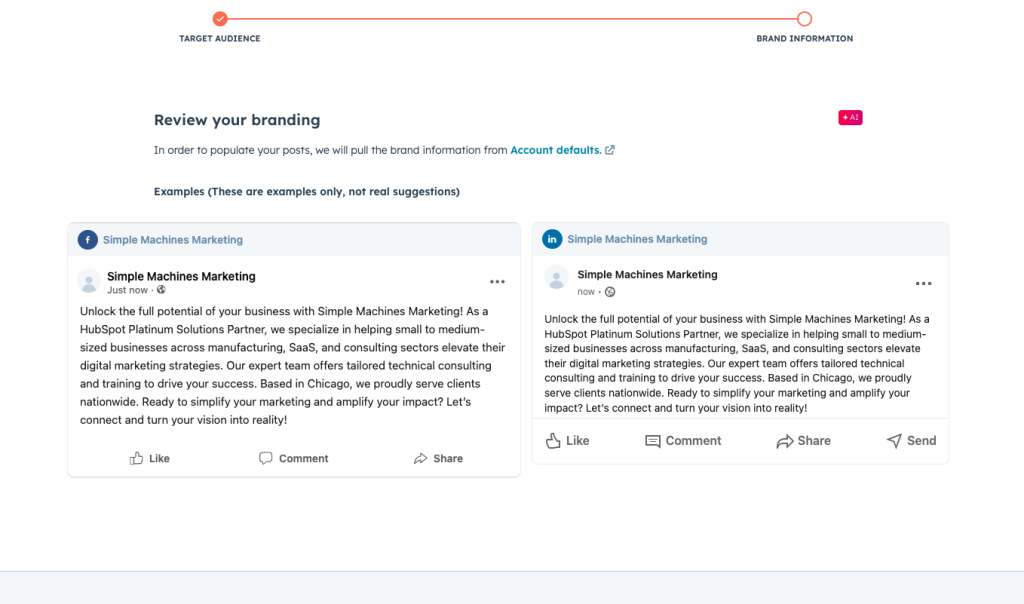
The Social Agent takes what you’ve given it to make a ‘branding’ sample. Based on the (quick and basic) information I fed it, it did a nice job:
On the next screen, you have access to the ‘Social post categories’. The list is straightforward and basic. The types of posts the Agent is poised to assist with include:
- Calendar events: This is nice to have in the portal, saving you from having to go elsewhere to see when National Pizza Day occurs. If it’s coming up, the Social Agent will tell you. Generating posts in this category requires no additional set-up or data entry.
- Products and service offerings: The Social Agent will generate posts based on the products and services you’ve entered into HubSpot.
- Marketing events: This category generates posts based on marketing events (webinars, networking events, seminars, etc.) listed in your Marketing Hub
- Brand content: These posts are based on your HubSpot-hosted blog content.
- Top performing topics: These are also based on HubSpot-hosted blog content.
- Educational content: The Agent creates posts based on up to five areas of expertise that you enter into the tool. These can be edited at any time.
Next, choose the type of post you’d like to develop from this list. Since I hadn’t entered anything but brand info into the tool, I started with calendar events. National Ugly Christmas Sweater Day caught my eye, so I clicked on the ‘Suggest post’ and voila, there’s a post:
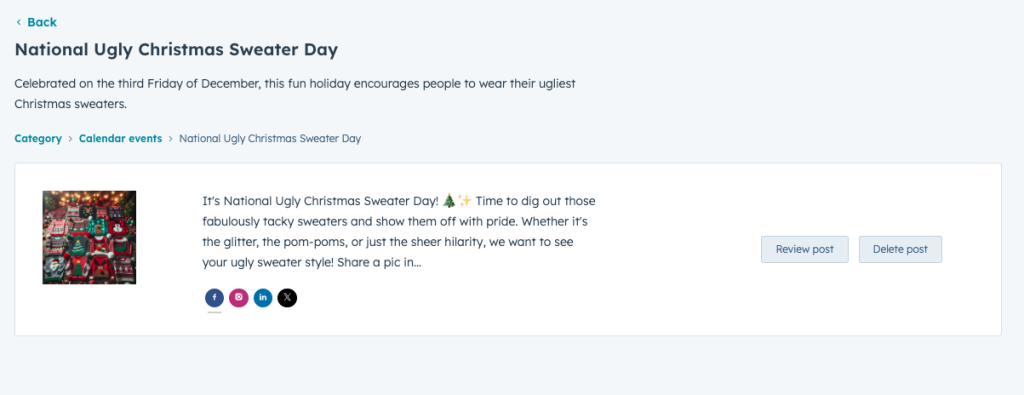
Not exactly right? No problem. Click on ‘review post’ and you can regenerate it.
On this screen, you can also see how the post would appear on different social media channels. They are all slightly different in this instance, tailored to the character limitations of each platform. They also appear to take cues from the description entered in the setup as far as tone and style.

The Agent also shares the rationale behind this post suggestion, which I found both amusing and interesting. For a newbie, this could be helpful.
The scheduling step is intuitive and very similar to scheduling posts in the social media tool within Marketing Hub. You can save it as a draft, schedule or delete it. Simply select the channels you’d like to post it on and you’re finished.
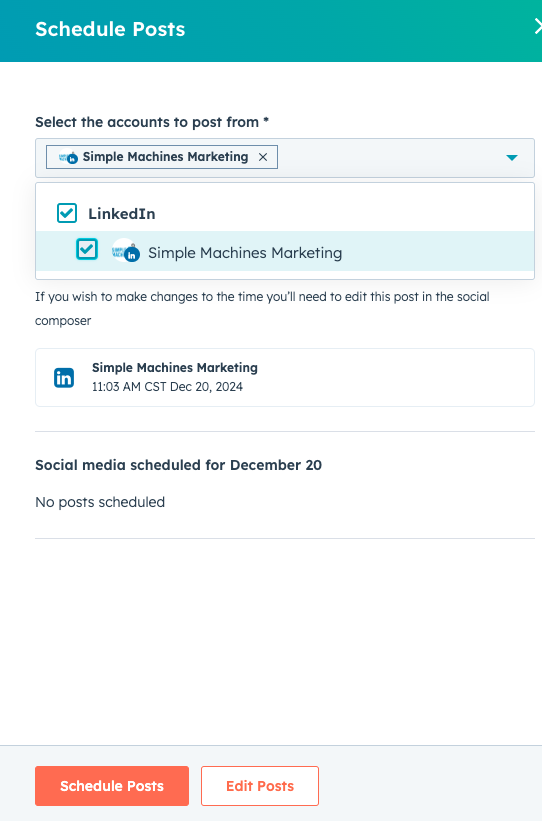
The post will show up on your social media calendar and behave just like any other HubSpot social media post.
I attempted to try other types of posts, but the Agent didn’t have enough information to generate anything. I was only able to get calendar event suggestions because 1) we don’t host our blog through HubSpot; 2) we haven’t had any marketing events and 3) we hadn’t filled in enough information to garner results for product and service offerings or educational content.
This is where it gets to be a bit of work. It’s not magic, after all. To be able to make worthwhile suggestions, the Agent requires a fair amount of information, most of which you enter into HubSpot on the AI Data Sources page:

As you can see, several categories need to be populated. Much like any generative AI tool, the better the prompts, the better the output. This is where the basic info about your company, ICP, products/services, etc. should live. This bank of information gives the Agent what it needs to work with to generate appropriate posts.
If you’re serious about using this feature, you need to do the prep work. It’s not difficult, just a bit time-consuming. You can (and probably should!) add, subtract, and edit it regularly to ensure information is up to date.
Feeding this agent is key. Where you input the information seems a bit scattered – only some of it is on this aforementioned page. But if you go into each suggestion category, it will tell you where you need to enter it. For instance, for Educational content, you need to enter areas of expertise. Just beneath the robot drawing telling you there are no suggested posts, you’ll find a link to ‘view topics of expertise’. If you need to add or edit those areas of expertise, you can get to it using the gray button on the right.

To test the Agent further, I added several products and services to the ‘product and service details’ on the Data sources tab and was able to generate this post:

It contains some tell-tale AI buzzwords, but it’s not terrible. It says what it needs to without being overly flowery or long. The image is appropriate for the post. Considering I put in limited information, it’s pretty good. With minimal editing, it would be even better.
Thoughts on the Social Media Agent
So what’s our initial assessment of the Social Media Agent? If I were a teacher, I’d give it a solid B. Here’s why:
If your blog is through HubSpot, the Agent can be a huge asset since two of the six types of posts it’s able to generate are based on blog content. But, if your blog is located elsewhere, you automatically miss out on a third of the possible post types. And truly, those kinds of posts (brand content and top-performing topics) are the meatiest and most likely to generate engagements.
That said, if you are serious about using the tool and willing to take the time (probably a couple of hours, initially with perhaps quarterly updates) to provide and maintain the required information (areas of expertise, products and services, brand information, etc.), it will provide countless relevant posts and save many hours of copywriting and finding appropriate images.
If you are scheduling posts for your own company (or one where you work in-house) finding and entering this information will be pretty quick and easy. If you’re scheduling social media for another entity, you will likely require their assistance with the setup. In this instance, though, the Agent could be of great benefit – as long as the information it uses to generate posts is detailed, up-to-date and well-maintained.
How Can You Get It?
Right now, Breeze is in beta and available to a limited number of HubSpot users. If you’re interested, you can request access and talk to your HubSpot rep to get started.
With Breeze Social Media Agent, you can stop stressing over your social strategy and start spending more time connecting with your audience. If you’re willing to do the initial setup, then AI can help you work smarter, not harder. It is here to make social media management… well, a breeze.
Have questions about HubSpot’s AI features or leveraging AI solutions for marketing and sales in general? Let us know and we’d be happy to help!