The Knowledge Base Agent is an underrated feature in HubSpot’s AI Agent arsenal, and it can open up new possibilities for your service team. It’s exciting because it can save your service team both time and money in the long run.
So what’s the big deal? The short answer is that Breeze AI can generate knowledge base articles for you. This means that if you’re constantly stuck, feeling like you’re answering the same question for your customers, Breeze AI will recognize that and generate an article for you. And this isn’t a generic answer either, it’s based on your tickets, tailored to your organization.
How does it work?
The Knowledge Base Agent works alongside your Customer Agents (both AI and Human) to gather information about your processes. This can be both the common problems that customers come to you with, and the common answers that your agents give. Using the information from tickets and emails, the Breeze Knowledge Base Agent is able to identify blind spots in your knowledge base.
Let’s say you’re a B2B company, and your customers commonly ask whether to repair or replace their units. Your agents always have the same follow-up questions and recommendations. The Knowledge Base Agent will identify that, and provide new knowledge base articles around whether repair or replace is best for that customer.
In short, it observes how your service team operates, and plays a supporting role in their success.
Key Benefits
- Retains institutional knowledge from your service team
- Saves time on drafting new knowledge base articles yourself.
- Supports your service team, giving them more time to focus on more complicated tickets.
- It continually improves through a loop of constant feedback
- Improved your customer’s self-service options.
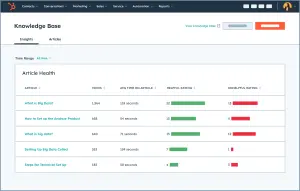
Keeping a healthy knowledge base helps customers serve themselves, and gives your service team more breathing room. Knowledge Base Agent helps surface new topics not covered by your existing knowledge base. This has helped some of our clients out a ton.
How to set it up:
First, check that you have a HubSpot Service Hub Professional or Enterprise subscription before continuing.
Next, make sure that you have enabled the feature in Service, then Customer Agent, then the launch modal in your HubSpot portal.
Third, manage gaps in your service portal. As your Service Agents answer questions, the Knowledge Base agent will highlight common topics. Once you’ve manually accepted the short-answer responses, Knowledge Base Agent will build those short answers into fully-fledged knowledge base articles.
And finally, and most importantly, monitor and refine.
The Knowledge Base Agent syncs weekly, so that it keeps up to date with the latest information. As time progresses, check the Performance tab. That will give you information about which knowledge topics are performing well, and will also know new knowledge gaps as your customers’ needs evolve.
Overall, Knowledge Base Agent has strong potential for enhancing your Service team. Once it’s set up, it will bolster your institutional knowledge base, and make sure that your customer’s questions are answered promptly.
Need help setting this up, or have ideas for your own organization’s HubSpot portal? Drop us a line and let’s collaborate!
You can also learn more about our AI solutions for sales and marketing here.