Marketing and sales pros know that lead management is the key to success and sustainable growth. We also know it can quickly become overwhelming without the right tools.
As a HubSpot Partner, we want to make lead management as painless (and productive!) as possible. Let's take a fresh look at HubSpot's Leads object — and how it can help streamline your sales process, keep reps organized and ultimately boost revenue.
What is the HubSpot Leads Object?
HubSpot's Leads object gives you a centralized space for managing active prospects within the Prospecting tab of the Sales Workspace. Instead of juggling endless contact lists or relying on custom properties, the Leads object gives users a clear, structured view of selling opportunities.

While it's technically called an "object," think of it as "object lite." A Lead can't exist on its own — it's always tied to a contact or company record. You can think of it as a more powerful, flexible evolution of the old lead status property.
Since its introduction, HubSpot Leads has improved greatly. Today, HubSpot Leads is fully integrated with lists, workflows, reporting, prospecting and even API access — making it a true engine for smarter selling.
How It Works
The Leads object behaves a lot like a deal: it tracks a prospect's journey through the early stages of the funnel, from initial engagement to qualified opportunity.
One of its best features? Contacts can have multiple Leads records. Unlike traditional systems that limit one lead per contact, HubSpot allows contacts to have multiple Leads records.
That means if a prospect goes cold and re-engages later, you can track each sales cycle separately — preserving historical context and improving your reporting.
For example, if a contact was disqualified last year for budget reasons but comes back now ready to buy, you can open a new Leads record without overwriting their history. You'll see every touchpoint, objection and opportunity clearly in their record.
How Leads Connect with Other HubSpot Tools
The Leads object integrates with:
- Lists: Segment leads for targeted campaigns, retargeting and sales reporting.
- Workflows: Automate lead nurturing and follow-up based on lead status and activity.
- Reports: Visualize conversion rates, pipeline growth and sales team effectiveness.
- Sales Workspace: Organize and prioritize leads, view suggested actions and streamline daily selling activities.
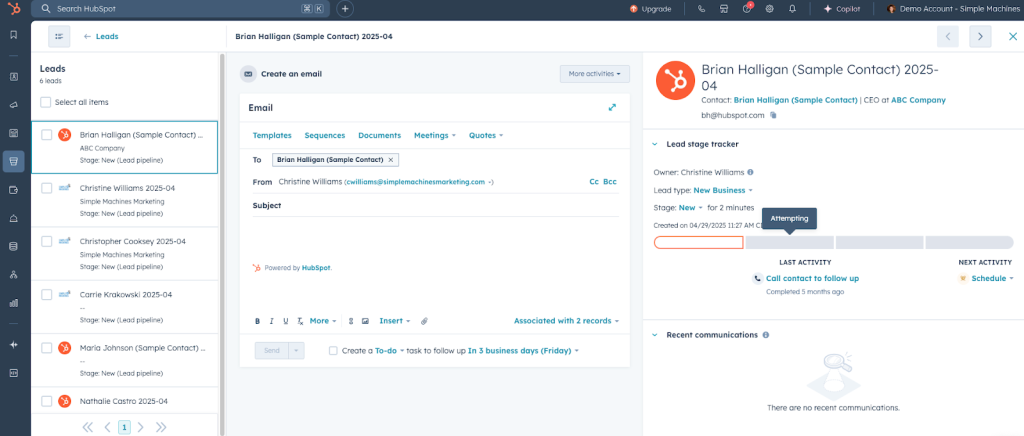
Leads also work in tandem with lifecycle stages.
While lifecycle stages (like Subscriber, MQL, SQL, Customer) track a contact's broad journey, Lead stages (like New, Contacted, Qualified, Disqualified) show the sales-specific progress within that broader journey.
Together, they give marketing and sales teams a unified view — and help sales managers analyze funnel health and rep performance.
Quick Note: With HubSpot's mid-2024 update, you can now create, manage, and automate Leads through the API — giving your team even greater flexibility and control.
Why the Leads Object Matters
With enhanced capabilities and tighter CRM integration, the Leads object solves critical challenges for both reps and sales managers:
- Clearer Organization: Leads centralize active prospects in one clean workspace — no more wading through cluttered contact records or confusing lists.
- Smarter Automation: Lead stages can automatically update based on actions and triggers, keeping pipelines accurate without manual work.
- Stronger Visual Guidance: The Sales Workspace offers suggested next steps and prioritized outreach activities — helping reps stay focused and move leads forward efficiently.
- Sharper Coaching Insights: Sales managers can leverage out-of-the-box lead funnel reports (and customize them) to better coach reps, spot bottlenecks and forecast more accurately.
- Continuous Improvements: With ongoing updates to API access, reporting and prospecting tools, HubSpot is making Leads an even more powerful tool for scaling sales efforts.
Recent Enhancements to the Leads Object
Since its initial rollout, HubSpot has continued to improve the Leads Object — giving sales teams and admins more control, visibility and efficiency. Here are a few of the latest features you should know about:
- Sync Lead Ownership and Activities: Managing lead assignments used to be a manual process — and often out of sync with contact or company ownership. Now, HubSpot lets you automatically sync lead ownership with associated contacts, companies and deals. This ensures reps stay aligned and outreach doesn't fall through the cracks. Activities logged on leads can also sync to the contact timeline, providing a more complete view of engagement.

- Leads Saved Views: For reps juggling dozens of leads, Saved Views (still in Beta) make it easier to focus. With this update, users can create custom, filterable views of leads based on stage, owner, last activity or other criteria — directly in the Prospecting tab of the Sales Workspace. This allows reps to prioritize their day and track their progress with less friction.

- Leads Summary: For admins and operations teams managing leads at scale, the new Leads Summary view is helpful. This interface gives you a high-level snapshot of lead performance across the portal, including status breakdowns, activity history, owner assignments and disqualification trends. It's ideal for reviewing rep activity, identifying bottlenecks and fine-tuning lead management strategy.
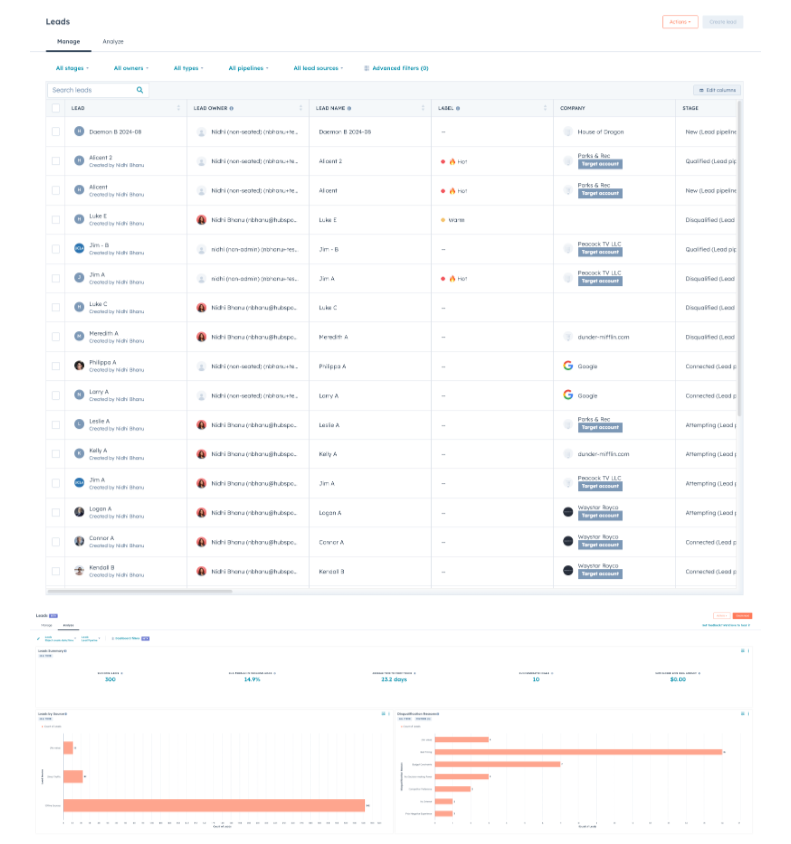
These enhancements reflect HubSpot's continued investment in making the Leads Object a powerful, scalable tool — not just for reps in the trenches, but also for the teams behind the scenes keeping the pipeline moving.
Final Thoughts
Managing Leads doesn't have to be messy. With HubSpot's Leads object, you can organize, track and engage prospects in a more streamlined, effective way without adding complexity to your CRM environment.
Ready to simplify and supercharge your lead management process? Contact Simple Machines Marketing today to learn how we can help you reach the full potential of HubSpot's Leads Object and build a faster, smarter sales pipeline.