More companies than ever are moving from Salesforce to HubSpot. At Simple Machines, we’ve seen this firsthand with a spike in migrations over the past few months alone.
Some clients are reacting to rising license costs and would rather spend the extra budget growing revenue. Others want a CRM that is easier to use or easier to maintain.
This guide explains why companies migrate, how the process works and how to avoid common mistakes.
Why switch from Salesforce to HubSpot?
Across SMB and mid-market teams, it’s evident that Salesforce fatigue is real. Businesses adopt Salesforce originally because it’s the market leader (aka the safe bet), but the reality of the cost, complexity and barriers to adoption ultimately cause them to switch.
Salesforce is powerful but heavier than most teams need
Salesforce offers deep customization but usually requires a steep investment in support through a dedicated admin or consulting group. Smaller teams end up with unused features, custom objects they do not understand and technical debt that slows down the business.
The result is underused software, high admin costs and long turnarounds for basic updates.
HubSpot has a lower total cost of ownership
Most Salesforce orgs spend more than the license price. The real costs come from admin time, external support, maintenance and required add-on modules. HubSpot consolidates marketing, sales and service tools in one platform and typically reduces the number of paid add-ons.
For example, HubSpot support is included in Professional and Enterprise subscriptions, but Salesforce premium support is extra. Salesforce also charges for over 10 GB of data storage, while HubSpot data storage is included. These are just a few examples.
With significantly lower total cost of ownership on HubSpot, companies can reinvest that savings into revenue-generating channels and resources.
(To calculate the total cost of ownership with HubSpot and your potential savings, you can use our TCO calculator.)
HubSpot drives higher adoption
Sales and service teams prefer using tools that feel intuitive. HubSpot’s interface allows reps to work faster and reduces friction during onboarding. High adoption leads to cleaner data and better reporting.
If you want to see a real-world example, here is how a global coatings manufacturer replaced Salesforce with HubSpot and modernized its revenue systems: Coatings Manufacturer Case Study.
Related: Seven Reasons to Switch From Salesforce to HubSpot
Go deeper: watch the discussion on Machine Logic
What is involved in a Salesforce to HubSpot migration?
In most cases, a migration is not a simple export and import. It requires a structured plan that aligns your CRM architecture with your sales process.
- Discovery and process mapping
We start each Salesforce to HubSpot migration by documenting your current and ideal future state process. This includes:
• How leads move through the funnel
• How deals progress through stages
• What data sales and marketing actually use
• What reporting leadership needs
The goal is to design a HubSpot system that supports your process, not copy your Salesforce setup.
- Data audit and cleanup
Most Salesforce orgs have aging data. Before you migrate, you should verify:
• Duplicate accounts and contacts
• Field consistency
• Lifecycle stage accuracy
• Picklist values
• Owner assignments
If you have a decade’s worth of historical data in your Salesforce, CRM data cleanup is not small task unless you’ve been meticulous about data hygiene. From standardizing fields like industry to making sure first and last names are separate, there tends to be a lot here to tackle. Plan accordingly, block out time to get it done and bring in reinforcements if needed to prevent delays.
- Object and property mapping
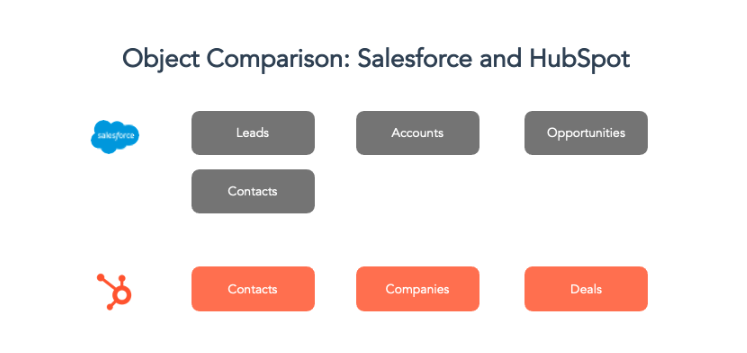
Image courtesy of HubSpot
Salesforce and HubSpot share core objects but use them differently. For example you must map:
• Accounts to companies
• Leads and contacts to contacts
• Opportunities to deals
• Custom objects to HubSpot equivalents or new pipelines
In many cases, Salesforce custom objects become HubSpot custom objects. In others, they can be retired.
- HubSpot configuration
Once your data structure is locked in, it’s time to configure HubSpot to match your process. This includes customizing things like properties, pipelines, stages, automation, lead routing, scoring and reports.
The setup phase is where HubSpot’s operational simplicity pays off because often times, updates do not require highly technical resources. That said, you should work with a partner that knows how to do Salesforce to HubSpot migrations.
- Data migration and testing
You should run migration in phases:
• Test import
• Validation
• Historical data import
• Active data import
• Final cutover
From experience, I can say that the two bullets above where people can get tripped up are the historical data import and the final cutover.
To avoid headaches, make sure ALL historical data is compiled and validated the first time – and get your ducks in a row so that you can stick to your final cutover date and not have to reimport again after the migration. Also, we always recommend picking a slower day of the week or weekend to plan the cutover.
Data migration tools
Depending on the complexity of data to be migrated, this can include using one or multiple of the following tools:
- HubSpot’s native Salesforce integration
- One of the more than 500 connector apps available in HubSpot’s marketplace for additional needs
- Data transformation software, which can cut down on time for more enterprise-scale data transfers
- Data mapping tools, which can automate the migration process and reduce the risk for errors
These tools will help you efficiently migrate data using a CSV file.
For more tailored and complex data migration scenarios, HubSpot APIs, or third-party integrators like MigrateMyCRM (formely Trujay) can provide necessary assistance.
- Integrations and user enablement
Your HubSpot instance should be usable on day one. We ensure that the core integrations, team permissions and settings your users need to work without friction are set up from the start.
How long does a Salesforce to HubSpot migration take?
Most migrations in the neighborhood of two to three months for smaller businesses and three to six months for mid-sized businesses, but it very much depends on data volume, number of custom objects, integration needs and internal alignment.
Complex Salesforce orgs with custom code, validation rules or a need for deep technical untangling may require more prep before import. Simpler setups can be done much quicker.
Common mistakes to avoid during a Salesforce to HubSpot migration
Copying Salesforce inside HubSpot
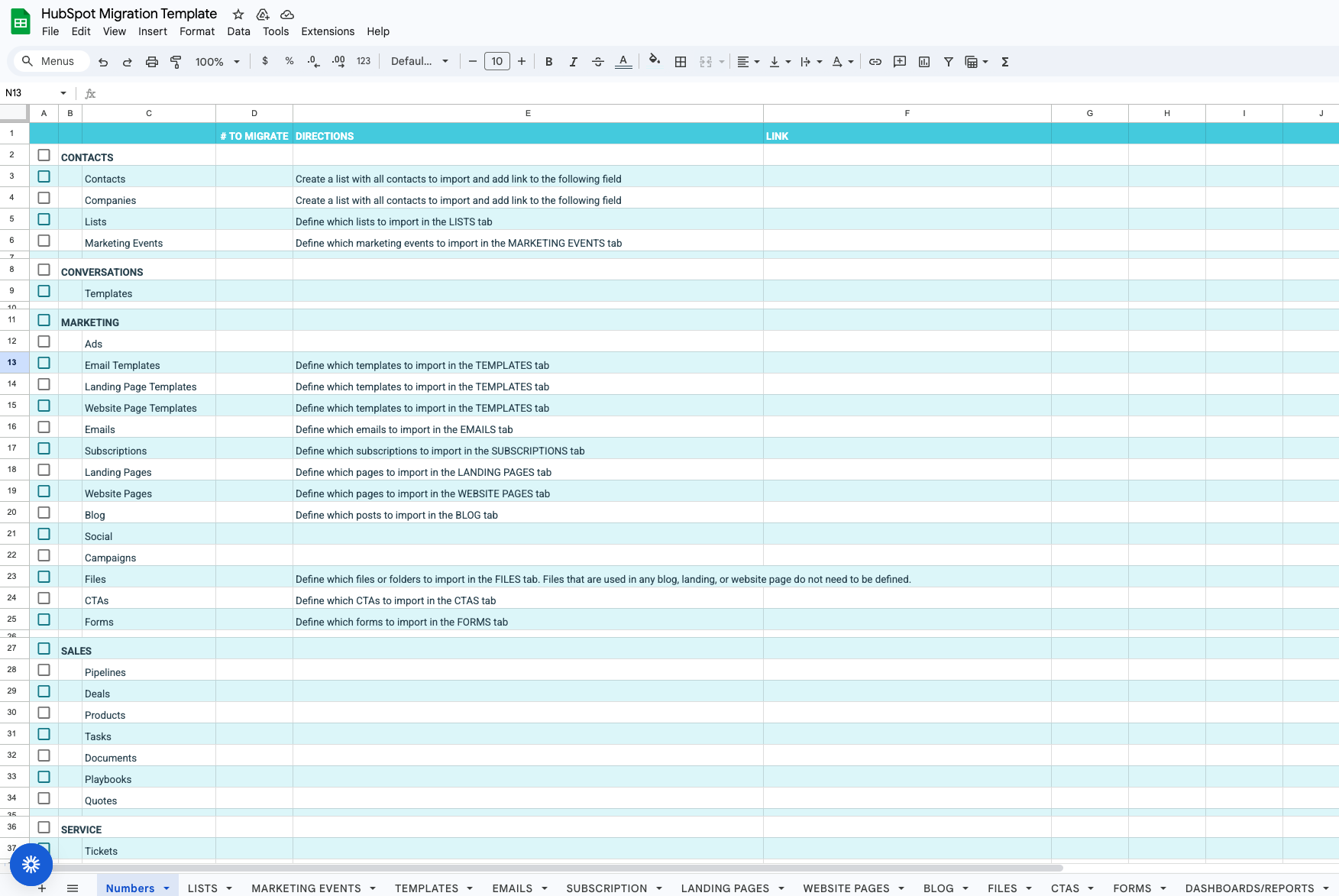
HubSpot is not Salesforce. Trying to replicate every custom field or object leads to unnecessary complexity. This is why we always use our migration planning spreadsheet to map out exactly what is going to live in HubSpot.
Migrating everything without a strategy
Not all data needs to move. You should define what is active data, historical data for reference and data that should be archived.
This is a great opportunity to do spring cleaning and drop the stuff you don’t need or that has been causing confusion.
Skipping stakeholder alignment
Your marketing, sales and service teams must agree on lifecycle stages, definitions and pipeline stages before import. Misalignment leads to low adoption and unreliable reporting.
This isn’t to say the leadership team needs to be on every meeting, but they should bless the planned architecture.
Skipping QA
Testing is the most important part of the migration. It catches object mismatches, broken associations and data errors before go-live.
With every migration we start with a small test import to review and QA live data before completing the full migration.
Skipping training
Yes, HubSpot is much more user-friendly than Salesforce, but that doesn’t mean no training is needed.
To position your team to quickly adopt and fully leverage HubSpot, work with a HubSpot certified trainer that has deep experience training teams that have migrated from Salesforce.
How much does it cost to migrate from Salesforce to HubSpot?
The unsatisfying but real answer is that costs truly vary based on complexity. If there’s been deep customization and you’re looking for help with extensive data cleanup, that’s a very different scope from a simpler instance with basic configuration.
That said, most companies see a meaningful drop in total cost of ownership after switching to HubSpot.
Companies reduce costs related to:
• Admin support
• External technical consultants
• Paid add-ons
• Duplicate tools in their revenue stack
HubSpot also shortens onboarding time and increases adoption, which improves return on investment.
What does a successful Salesforce to HubSpot migration look like?
A strong migration results in:
• Clean, unified data
• Higher CRM adoption
• Accurate and trusted dashboards
• Faster reporting
• A simpler tech stack
• A CRM your team can largely self-manage with proper training and enablement
Our coatings manufacturer migration is a good example. After replacing multiple disconnected tools and a custom Salesforce setup, the company saw immediate improvements in reporting and sales forecasting.
How Simple Machines supports Salesforce to HubSpot migrations
Simple Machines’ migration service includes strategic planning, data cleanup, HubSpot configuration, testing and structured training to ensure adoption.
More detail is available here: Salesforce to HubSpot Migration Service
We design systems that teams actually follow through embedded enablement, process governance and ongoing RevOps support. Migrating your CRM is the right moment to not only move your data but also strengthen your revenue process.
Ready to plan your Salesforce to HubSpot migration?
If you want help scoping your migration or want expert input on your plan, we are happy to talk. We can review your current Salesforce setup and give you a migration approach that fits your timeline, budget, and team resources.